

Overview
The Generic Neuron enables developers to create custom blocks with dynamic outputs tailored to specific API response patterns. While the standard HTTP Neuron provides a simple binary success/failure model, Generic Neurons allow for more sophisticated integration scenarios where APIs return multiple distinct response states that require different handling logic and conversation routing. Generic Neurons are pre-registered blocks that extend the BotBuilder’s functionality beyond the standard blocks available in the left sidebar menu. Under the hood, these blocks are also HTTP calls, but they provide the capability to implement branch-based responses with multiple outputs. This makes Generic Neurons ideal for scenarios where an API integration needs to handle various business logic states, such as “user not found,” “insufficient permissions,” “payment required,” “rate limit exceeded,” or any other custom response patterns that require different conversation flows or user messages.Creating Generic Neurons
To create a Generic Neuron, you must register it by making an HTTP request to Talqui’s registration endpoint. This registration process creates a custom block that will appear in the BotBuilder’s editor, making it available for use in your conversation flows.Registration Endpoint
To register a Generic Neuron, make a POST request to:<tenantID> with your tenant ID.
Registration Request
The registration request must include the following information:neuronExtensionLabel: A human-readable label for your neuron (this will appear in the editor)neuronExtensionDescription: A description explaining what the neuron doesneuronExtensionEndpoint: The URL where requests will be sent when this neuron executesneuronExtensionIcon: An icon identifier for visual representation in the editorneuronExtensionSchema: A JSON Schema defining the parameters/inputs that this neuron acceptsneuronExtensionOutputs: An array of output definitions, each with:id: A unique UUID for the outputkey: A unique key identifier (e.g., “IDENTIFICATION_SUCCESS”)label: A human-readable label for the output
FAILED_TO_EXECUTE) is automatically created for all Generic Neurons, even if you don’t specify it during registration. This serves as a fallback when the neuron cannot process the request or when no output is selected in the response.
Registration Example
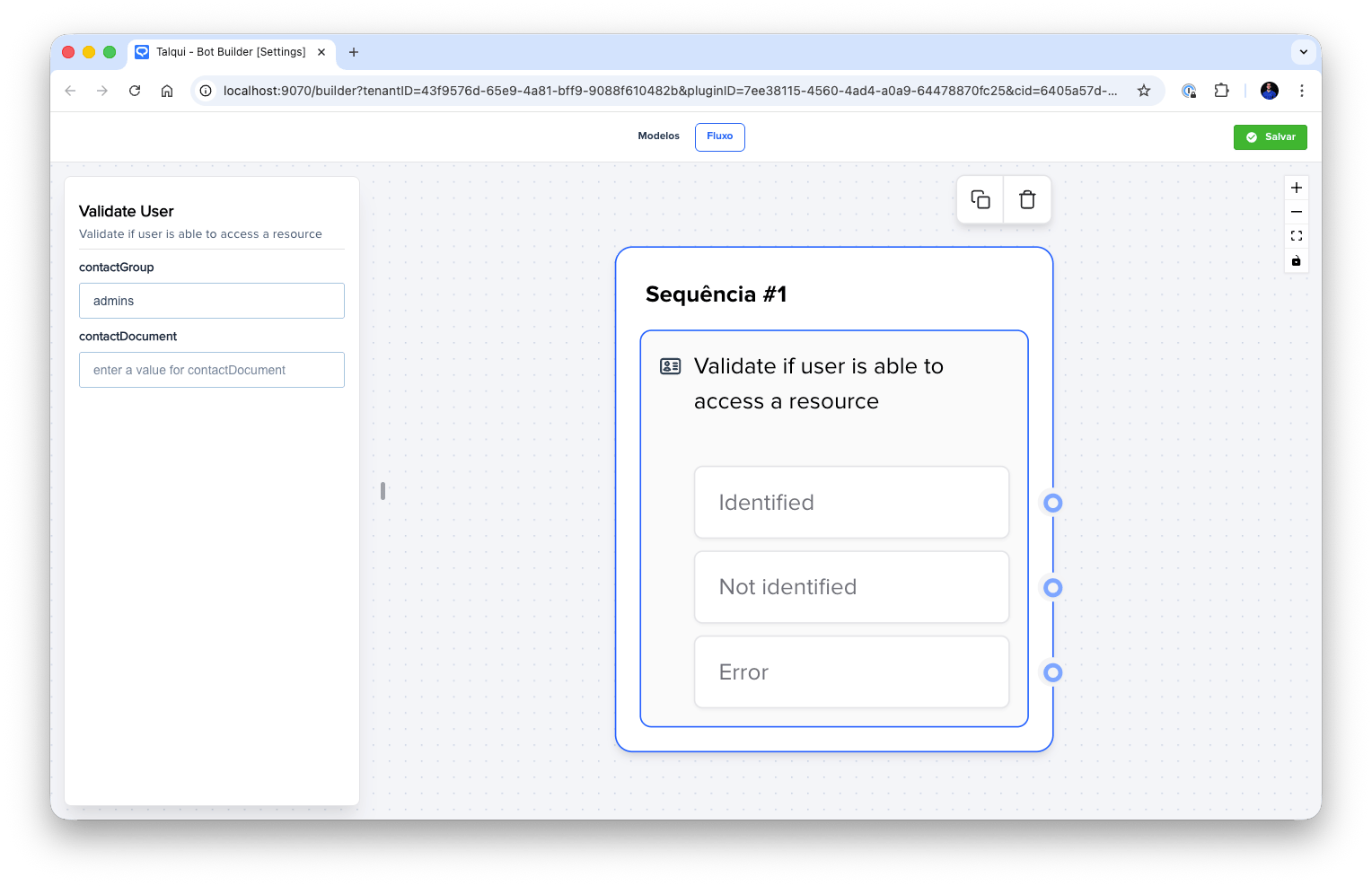
Generic Neuron
Defining Custom Parameters with JSON Schema
When registering a Generic Neuron, you can define custom parameters that will be available as inputs in the BotBuilder editor. These parameters are defined using JSON Schema, which allows you to specify:- Parameter types (string, number, boolean, etc.)
- Required vs optional parameters
- Default values
- Validation rules
Request Format
When a Generic Neuron executes in a conversation flow, Talqui sends a POST request to the endpoint you specified during registration. Understanding the request format is essential for implementing your integration correctly.Request Method and Headers
All Generic Neuron requests are sent using the POST method. The request includes the following headers:Content-Type:application/jsonuser-agent:Talqui (Neuron PluginGeneric) v1.0, Neuron <neuronExtensionLabel>
user-agent header includes the label you specified during registration, allowing you to identify which Generic Neuron is making the request. This is particularly useful if you have multiple Generic Neurons pointing to the same endpoint.
Request Payload
The request body contains three main sections:message: A descriptive message indicating the request originparams: An object containing all the parameters configured in the BotBuilder editor when the neuron was added to the flow. These parameters can include:- Static values entered during flow design
- Variables from conversation context (using
{{ variableName }}syntax) - Session-scoped variables (using
{{ meta.variableName }}syntax) - Contact-scoped variables (using
{{ meta.variableName }}syntax)
metadata: Contains identifiers that allow you to access additional information:sessionID: Unique identifier for the current conversation sessiontenantID: Your tenant identifiercontactID: Unique identifier for the contact/user in the conversation
Accessing Additional Data
If your Generic Neuron needs to retrieve additional information about the session, tenant, or contact, you can use Talqui’s REST API with the identifiers provided in themetadata object. The REST API allows you to:
- Read session variables and state
- Access contact information and contact-scoped variables
- Retrieve tenant-specific configuration
- Perform other operations based on your integration needs
Request Timeout
Generic Neuron requests have a timeout of 20 seconds (20,000 milliseconds). If your endpoint does not respond within this timeframe, the request will be considered failed and the conversation flow will route through the error output (FAILED_TO_EXECUTE).
Response Format
Your Generic Neuron endpoint must return a valid JSON object. The response format determines both which output path the conversation will follow and which variables will be stored in the conversation context.Output Selection
The most important aspect of the Generic Neuron response is indicating which output path the conversation should follow. This is done by including anoutputID field in your response:
outputID must match one of the UUIDs you specified in the neuronExtensionOutputs array during registration. If your response includes a valid outputID, the conversation will route to that specific output path.
Important: If your response does not include an outputID, or if the outputID doesn’t match any registered output, the conversation will automatically route to the error output (FAILED_TO_EXECUTE), which is always available as a fallback.
Returning Variables: sessionMeta and contactMeta
Similar to the HTTP Neuron, Generic Neurons can return variables that will be stored in the conversation context. The response JSON can contain two optional properties:sessionMeta: Variables stored in the session context (specific to the current conversation session)contactMeta: Variables stored in the contact context (persists across all conversations with a specific contact)
{{ meta.variableName }} syntax.
Variable Flattening
If you return nested objects withinsessionMeta or contactMeta, they will be automatically flattened (planified) and saved as flat objects using dot notation as separators. For example:
Your API Response:
meta.user.name= “John”meta.user.account.id= “12345”
Complete Response Example
Dynamic Outputs
The key advantage of Generic Neurons over the standard HTTP Neuron is the ability to define multiple dynamic outputs. Unlike the HTTP Neuron’s binary success/failure model, Generic Neurons allow you to create as many outputs as needed, each representing a different business logic scenario or response state. Output selection is controlled entirely by your API response through theoutputID field. This gives you complete flexibility to implement complex routing logic based on:
- Business logic states (e.g., “user verified”, “user not found”, “insufficient permissions”)
- Data validation results (e.g., “valid”, “invalid format”, “missing required field”)
- Process outcomes (e.g., “payment successful”, “insufficient funds”, “card declined”)
- Any custom conditions relevant to your integration
Use Cases
Generic Neurons are particularly useful when integrating with APIs that have complex response patterns or when building chatbots that need to handle multiple business logic scenarios. Common use cases include:- Payment Processing: Handling various payment states (success, declined, insufficient funds, etc.)
- User Authentication: Differentiating between successful login, invalid credentials, account locked, etc.
- Data Retrieval: Handling cases where data exists, doesn’t exist, requires permissions, etc.
- Multi-step Processes: APIs that return different states indicating progress through a workflow
In Talqui’s BotBuilder, blocks are also referred to as Neurons, and the connections between blocks are analogous to synapses between neurons. This naming convention reflects the interconnected nature of the flow-based architecture, where blocks connect and communicate like neural pathways.