Chatbot (Flow Builder)

Neuron: HTTP

Updated on January 31, 2026

Overview

HTTP Neuron

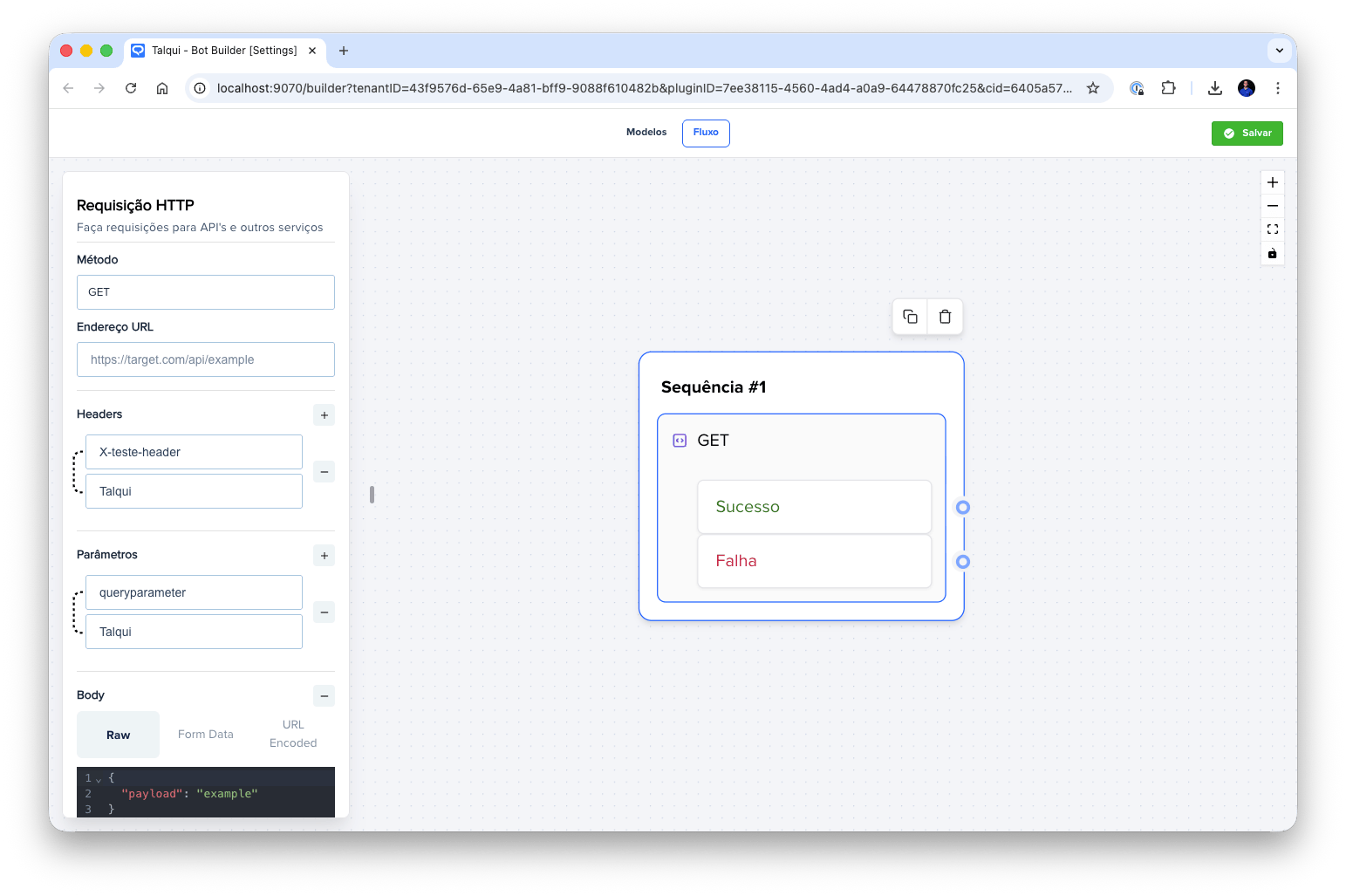
The HTTP Neuron is a powerful component in Talqui's Chatbot Builder that enables chatbots to make HTTP requests to external APIs and services. This neuron allows developers to integrate their chatbots with backend systems, third-party services, databases, and any other HTTP-based endpoints, making it possible to create dynamic conversational experiences that can retrieve real-time data, submit user information, perform calculations, and interact with external systems seamlessly. The HTTP Neuron supports multiple HTTP methods including GET, POST, DELETE, and PATCH, providing flexibility to handle various types of API interactions commonly used in modern web applications.

When configuring an HTTP Neuron, developers can specify the target URL, choose the appropriate HTTP method, and configure request parameters including headers, query parameters, and request body. The block supports sending data in different formats, allowing developers to send form-encoded data or JSON payloads depending on the requirements of the API being integrated. Headers can be customized to include authentication tokens, content-type specifications, and any other custom headers required by the target API. Query parameters can be added to the URL for GET requests or other methods that support URL-based parameters, making it easy to pass filters, pagination options, or other query-based data.

Request Format

When the HTTP Neuron executes a request to your API endpoint, you will receive:

Request Identification

All requests sent by the HTTP Neuron include a specific header that identifies the request as originating from Talqui:

  • User-Agent Header: Talqui (Neuron DeveloperHttp) v1.0

This header allows you to identify and filter requests coming from Talqui's BotBuilder system. You can use this information for logging, analytics, or to apply specific handling logic for Talqui-originated requests.

Request Payload

The HTTP Neuron sends the data you configure in the neuron settings as the request payload. This includes:

  • Headers: All custom headers you configure in the neuron will be sent in the request
  • Query Parameters: Parameters configured for the request will be included in the URL query string
  • Request Body: The body content you configure (form-data, URL-encoded, or raw JSON) will be sent according to the selected format

The data you input in the neuron configuration will be processed and sent exactly as configured, allowing you to receive the information you need on your API endpoint.

Request Timeout

The HTTP Neuron has a timeout of 20 seconds (20,000 milliseconds). If your API does not respond within this timeframe, the request will be considered failed and the conversation flow will route through the failure output.

The HTTP Neuron has exactly two possible outputs: success or failure. When the HTTP request is executed, the system evaluates the response to determine whether the request was successful or failed, and routes the conversation flow accordingly. This binary decision model simplifies flow design for most use cases, where developers typically need to handle either a successful API response or an error scenario. The success path is taken when the HTTP request completes successfully and returns a 2xx status code response, while the failure path is used when the request returns any status code outside the 2xx range, times out, or encounters an error.

The HTTP Neuron also supports receiving variables that can be injected into the current conversation context. These variables can be stored in either the contact context or the session context, which are separate entities. The contact context persists across all conversations with a specific contact, while the session context is specific to the current conversation session. This allows developers to pass data between blocks and maintain state throughout the conversation flow.

Expected Response Pattern

The HTTP Neuron determines whether to route the conversation to the success or failure output based on the HTTP response received from the target API. The system evaluates the response status code, response body, and other response characteristics to make this determination. Typically, HTTP status codes in the 2xx range (200, 201, 204, etc.) are considered successful, while status codes outside the 2xx range (4xx, 5xx, etc.) are treated as failures.

Response Requirements

For a request to be considered successful, your API must return:

  1. HTTP Status Code: A status code in the 2xx range (200, 201, 204, etc.)
  2. Valid JSON Object: The response body must be a valid JSON object (or the response can be empty, as some 2xx status codes like 204 No Content don't require a body)

Important: The HTTP Neuron will route to the success output if it receives a 2xx status code, even if the response body is empty. However, if you want to return variables that can be used in subsequent blocks, you must return a valid JSON object.

Returning Variables: sessionMeta and contactMeta

If your API returns a valid JSON object, you can include variables that will be stored in the conversation context. The response JSON can contain two optional properties:

  • sessionMeta: Variables stored in the session context (specific to the current conversation session)
  • contactMeta: Variables stored in the contact context (persists across all conversations with a specific contact)

Each of these properties can contain up to 20 variables. Variables returned in these properties will be made available to subsequent blocks in the conversation flow and can be accessed using the {{ meta.variableName }} syntax.

Variable Flattening

If you return nested objects within sessionMeta or contactMeta, they will be automatically flattened (planified) and saved as flat objects using dot notation as separators. For example:

Your API Response:

{
  "sessionMeta": {
    "user": {
      "name": "John",
      "account": {
        "id": "12345"
      }
    }
  }
}

Stored Variables:

  • meta.user.name = "John"
  • meta.user.account.id = "12345"

This flattening process allows you to return complex nested structures while making them easily accessible in subsequent blocks through simple dot notation.

Success and Failure Routing

When the HTTP Neuron executes:

  • Success Output: Triggered when the request completes successfully and returns a 2xx status code. If the response is a valid JSON object containing sessionMeta or contactMeta, those variables will be stored and made available to subsequent blocks.

  • Failure Output: Triggered when:

    • The request returns a status code outside the 2xx range
    • The request times out (after 20 seconds)
    • The request encounters a network error
    • The response body contains invalid JSON (when a body is present)

The response data from successful HTTP requests is made available to subsequent blocks in the flow, allowing developers to use the API response to customize messages, populate variables, make decisions, or trigger additional actions. This enables chatbots to provide dynamic, data-driven responses that reflect real-time information from external systems.

Multiple Output Scenarios

The HTTP Neuron is designed with a binary success/failure model to keep flow design simple and maintainable for the majority of use cases. However, some APIs may return multiple distinct response states that require different handling logic. For example, an API might return different status codes or response structures for various business logic scenarios, such as "user not found," "insufficient permissions," "payment required," or "rate limit exceeded," each of which might require different conversation flows or user messages.

If you need to handle multiple response states from an API integration, Talqui provides the Generic Neuron capability, which allows developers to create custom blocks with multiple outputs tailored to specific API response patterns. Generic Neurons enable the creation of specialized blocks via HTTP that can evaluate API responses more granularly and route conversations to different outputs based on specific response characteristics. This approach provides the flexibility needed for complex integrations while keeping the standard HTTP Neuron simple and easy to use for common scenarios.

To learn more about creating custom blocks with multiple outputs using Generic Neurons, refer to the Generic Neuron documentation, which explains how to build specialized blocks that can handle complex API response patterns and provide multiple routing options based on different response states.