The conversation widget
The widget is the operator-facing element of a plugin: a small single-page application that Talqui embeds as an iframe in the right sidebar of the conversation screen. While an operator answers a chat, the widget sits next to the conversation and surfaces exactly the external context and actions that conversation needs — an order status, a customer's CRM record, a button to open a ticket — so the operator never has to leave Talqui or switch browser tabs to get their job done. This is the single most important product outcome of the widget: a unified workspace.
A complete, working example is available in the talqui-oss/talqui-plugin-example repository: the ice-cream shop widget with Flavors and Stock tabs, and a popup for placing orders. Use it as a reference for the boot dialogue, calling the backend, and opening popups.
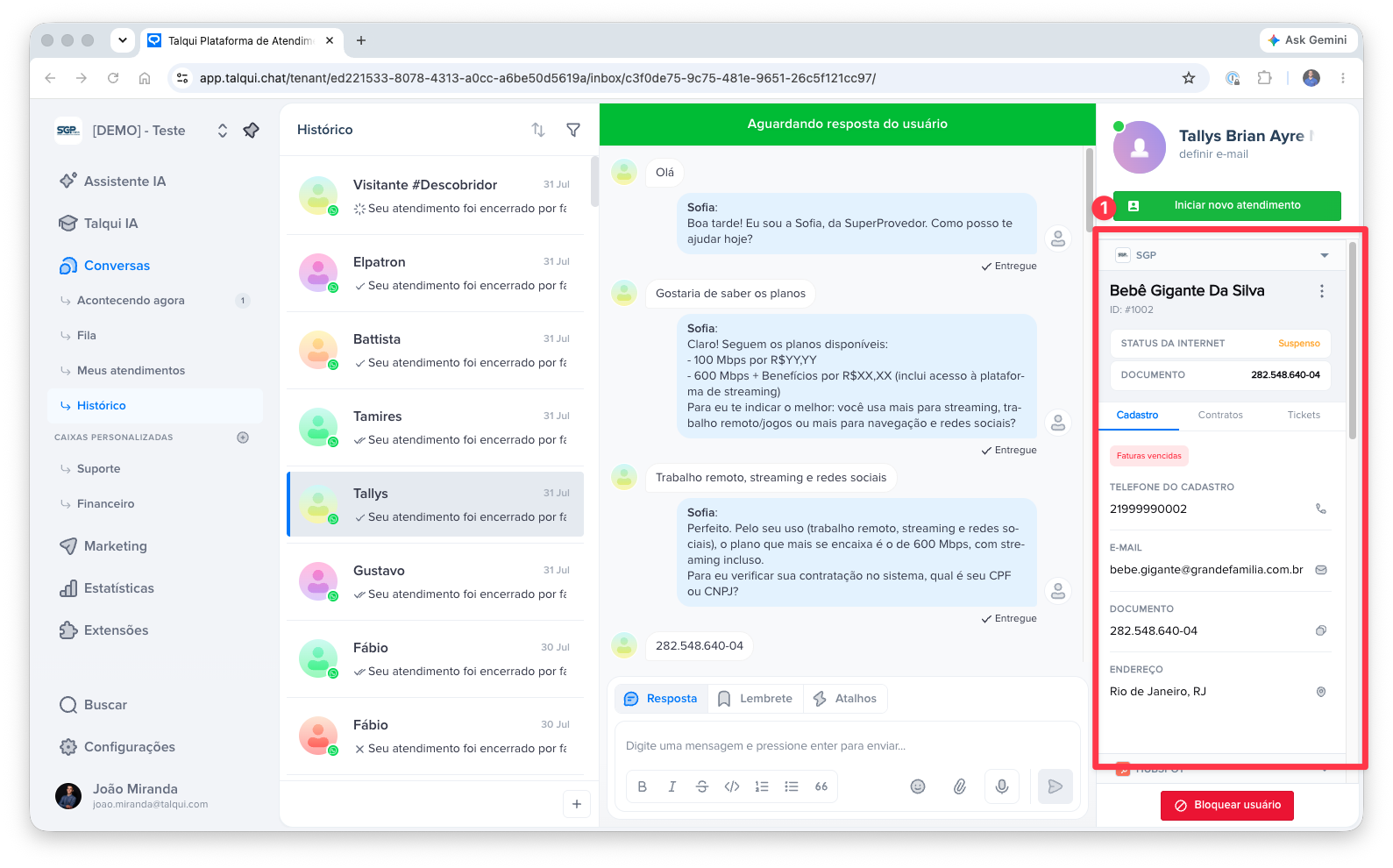
Why the widget is "stateless per conversation"
The widget is re-rendered from scratch every time the operator opens a different conversation. When the agent switches from one chat to another, Talqui reloads the widget's iframe entirely, giving it a fresh context for the newly selected conversation. The widget holds no memory of the previous chat — it treats every load as a clean start.
This design is deliberate and has a direct consequence for how you build: the widget must, on every load, ask the platform which conversation it is now attached to. It does not read that from a URL it controls or from local storage; it obtains it through a live dialogue with the host over the iframe boundary.
The communication channel
An iframe and the page that hosts it are isolated by the browser: for security, they cannot call each other's code. The only way across the boundary is the browser's postMessage channel. The widget therefore opens what is best understood as a small event channel with the Talqui Web App and holds a short dialogue over it:
- The parent (Talqui Web App) posts messages down into the iframe. The widget receives them with
window.addEventListener('message', …). - The widget posts messages up to the parent with
window.top.postMessage(…).
Every message is a JSON envelope of the shape { name, data, widgetID? }; anything that is not one of these is ignored.
The boot dialogue
Think of the exchange below as a question and its answer. On load, the widget is told who it is, reports how tall it wants to be, and then asks the platform which conversation is currently open. The platform answers with that conversation's session. From that answer, the widget knows the session and the contact it is now serving and can call the backend scoped to them.
| Step | Direction | Event | Meaning |
|---|---|---|---|
| 1 | host → widget | widget:init |
"You are instance widgetID." |
| 2 | widget → host | widget:height |
"Render my iframe this tall." |
| 3 | widget → host | widget:acquire-session |
The question: "Which conversation (session) is open right now?" |
| 4 | host → widget | widget:session |
The answer: the current session payload (session + contact context). |
Because the platform hands the widget the session and its contact, the plugin can build a genuinely unified experience: it knows who the operator is talking to and which conversation this is, without the operator ever telling it. For the meaning of a session and how conversations are opened and identified, see Sessions and Session Start.
widget:session answer. This is what guarantees the sidebar is always showing context for the conversation the operator is actually looking at.You can see this boot dialogue implemented in the talqui-oss/talqui-plugin-example: the ice-cream shop widget listens for widget:init, reports its height, sends widget:acquire-session, and then stores the session context to scope its backend calls.
Calling the backend
Once the widget knows its session, it calls the plugin backend's REST routes to fetch and mutate data. The operator's access token, delivered by the host as part of the widget's context, is attached to those requests so the backend can authorize them (see Backend › Authentication and Authentication). All integration logic stays on the server; the widget only renders and dispatches.
In practice, the ice-cream shop widget calls POST /v1/flavors/search and POST /v1/stock/list to populate its tabs. See the implementation in the talqui-oss/talqui-plugin-example to see how requests are built with the session context and authorization token.
Popups: acting without leaving the conversation
Some actions need more room than a sidebar — a multi-field form, a confirmation step. For these, a widget can ask the host to open a second, modal iframe floating over the conversation: a popup. The widget sends a modal:show event up to the host with a URL to load; the host opens that URL in its own modal iframe. The URL points back at the plugin's own front-end (another route of the same app, e.g. /popup/order/:id), so a popup is simply another screen of the plugin.
A popup is a separate iframe and therefore does not take part in the sidebar's widget:init dialogue. Instead, the host appends the context to the popup's URL as query parameters (?tenantID=&sessionID=&widgetID=&p-token=); the popup reads them on load and uses the token to call the backend. When it finishes (for example, after creating a record), the popup closes itself with a self-close message.
| Event | Direction | Purpose |
|---|---|---|
modal:show |
widget → host | Open a popup at a given URL (a /popup/... route of the plugin). |
widget:height |
popup → host | Report the popup's content height so the host sizes the modal. |
| close | popup → host | Dismiss the popup (self-close protocol). |
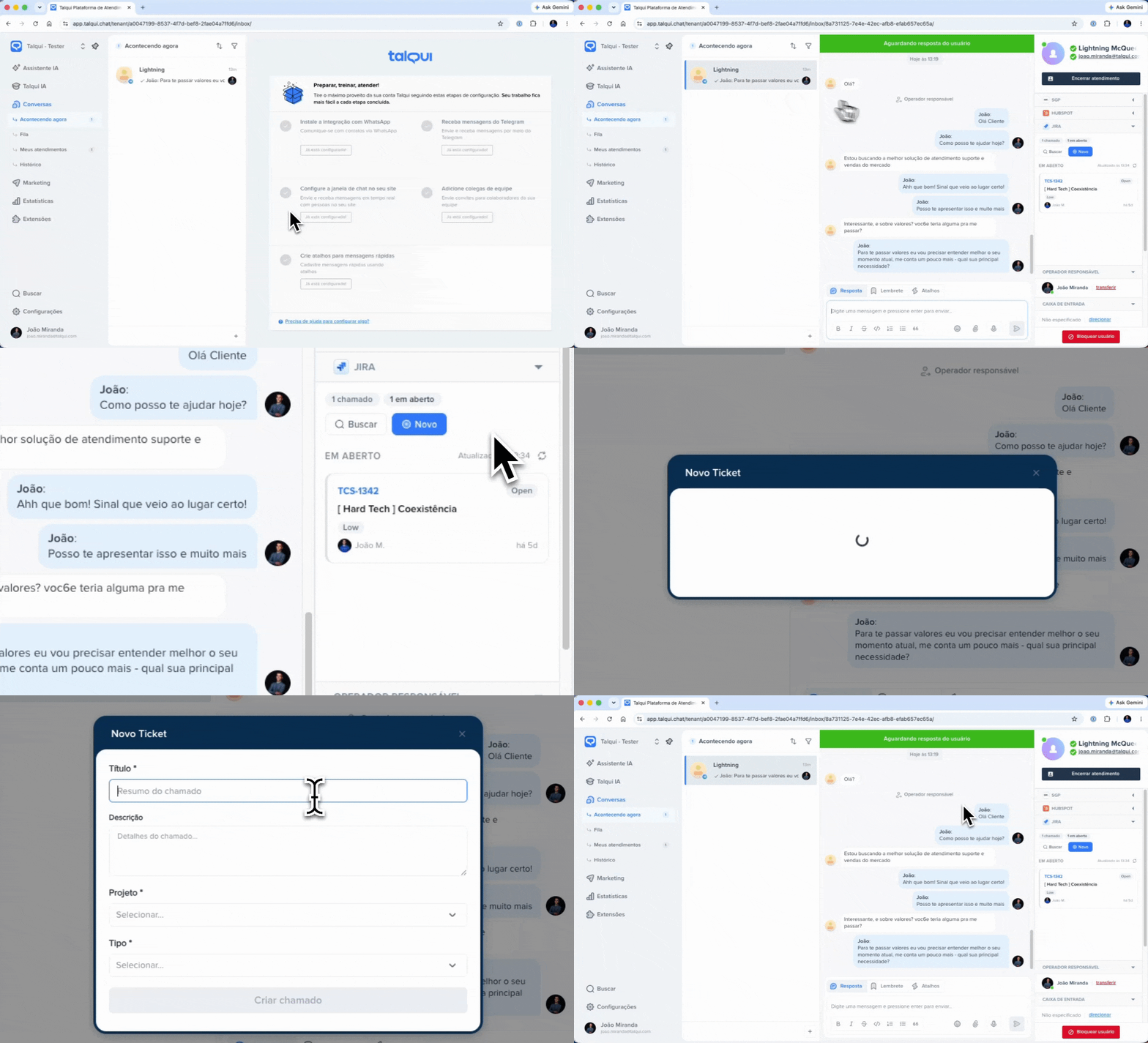
The ice-cream shop example demonstrates this pattern in action: when the operator clicks "Order" on a flavor, the widget sends modal:show with the order form URL, and the popup opens over the conversation. Once the order is confirmed (via POST /v1/orders/create), the popup closes itself. See the implementation in talqui-oss/talqui-plugin-example.
Design guidance
- Do the least in the browser. The widget renders and dispatches; the backend owns credentials and integration logic.
- Always derive context from
widget:session. Never assume the previous conversation's data survives a reload. - Report your height. Use
widget:heightso the iframe fits its content and the sidebar looks native. - Keep popups self-contained. They get context from the URL, do one job, and close themselves.